
phpZoteroWebDAV 2.0 – Download and Installation
Features (! means new in 2.0)
- sync library attachment to any php enabled webhosting space (including freely available ones) through a php based WebDAV implementation. This means that you attachment data never has to be stored on computers (clients and servers) that you do not control yourself.
- ! access your zotero library through zotero.org server API, including sorting, detail view, custom number of items per page etc
- ! view your synced attachments from any web browser without having to use zotero.org’s own storage server
- ! unlike zotero.org’s own attachment viewing feature, phpZoteroWebDAV allows you to view web snapshots as well
Download
- Download phpZoteroWebDAV 2.0 (md5=50ff48cb0f6bf1326bcaea551c76edcc) directly from this site. Note that while I strive to keep this download link up to date, some minor updates might not be included yet. Therefore, if you want to ensure to use the most up-to-date code, use the github link below.
- phpZoteroWebDAV is on github, so if you want to make modifications to the code, you can fork it there. This repo also contains always the most recent version of the code.
Installation
Simply unzip the zip file you just downloaded and upload it to your webspace (you might want to complete the steps in the server part of the configuration instructions below first), e.g. to www.example.com/zotero. You must make sure that both the “data” and “cache” are writable by the user that runs your php process (ask your hosting service and/or google if you don’t know how – chances are good that you don’t need to do anything) and I would strongly suggest to password protect the directory that you just uploaded your script to (for example using .htaccess – again, google how or ask your hosting company) – otherwise your data will be accessible for everybody who knows/guesses the URL.
In the above example, www.example.com/zotero will be the address you use to access your library view and the attachments.
Configuration
There are two parts to configure: the server site (i.e. the settings for the script itself, contained in the file settings.php) and your zotero client. I will walk you through both parts:
1. Server Configuration
The zip file you just downloaded and unzipped contains a file “settings.php”. Open this file with your favourite text editor. The parameters that MUST be set are the first two: $API_key and $user_ID. Navigate to https://www.zotero.org/settings/keys to get these values (you might have to sign in to your zotero.org account). On that page you see “Your userID for use in API calls is….” – the number that follows here goes in $user_ID. The you need to “Create new private key” for the script to use. Give it only as much power over your library it needs: the script only needs read access to your personal library, so you can disable everything else (have a look at this screenshot for the correct settings). Once created, copy and past the key into $API_key. Now you can have a look at the other settings (but you can also just keep defaults) and once save the settings.php file and upload it to your webserver. That’s all for server settings.
2. Client Settings
In your zotero client (i.e. in firefox or standalone zotero), open the sync tab in the preferences. In the “File Syncing” section, select “WebDAV” from the list. In the URL field make sure you select “http” instead of “https” unless you are very very sure that the ssl on your webserver is set up correctly. In the address field enter the URL that points to the directory to which you just uploaded the script (e.g. www.example.com/zotero) and then add “/webdav_server.php”, so that the whole path (including the “/zotero” suffix that cannot be changed) would be www.example.com/zotero/webdav_server.php/zotero
For username and password use the values that you created when setting up password protection as I advised you above. It is important to note that even if you ignored my well meaning advice and did NOT set up password protection for that directory, you still need to enter something in these fields.
Once this is all set up, you should be able to “Verify Server” and make your first sync, after that you can try and access your library and the attachment though this script.
Live Demo
Answering to requests I received, there is now also a live demonstration installation of the library and attachment viewer on my site.
Good luck and share any successes or failures (including detailed description of what is going wrong) either here or on the relevant thread at zotero.org (chances might be higher you get a reply there).
If you want to read about background and motivation for this project, there is another blog post related to that.


 Themocracy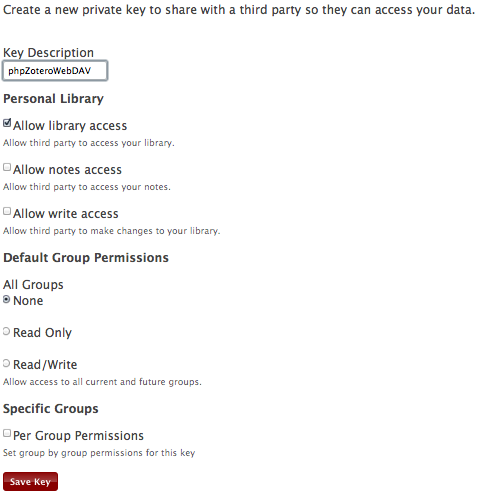
Hi,
First, I would like to thank you for sharing this script, very useful.
I’ve installed it, and sync works nice.
The only problem I’ve encountered is with index.php. It does not locally display the library , whereas it is visible on zotero.org account.
Any advices?
frederic
Hi Frederic,
I had a look at your settings.php and all seems in order. However, using your API key I get a “Forbidden” error message back from zotero.org so it seems like you are using the wrong permissions. Have a look at this screenshot and make sure your settings match.
Christian
After some email exchange with Frederic, it turned out that he actually had forgotten to give the script read permissions to his zotero library in the settings on zotero.org. As a result I added the screenshots of the settings page to these installation instructions.
Hi Christian,
I’m having some trouble getting the sync to work… I’ve edited the settings to include my key and ID and dropped the folder into my server, but Zotero continues to give me a permissions error:
You don’t have permission to access /zotero/webdav_server.php/zotero/
on the WebDAV server. Please check your file sync settings or contact
your server administrator.
When I turn on all permissions for the folder and all subfolders, I receive the following error:
Your WebDAV server returned an internal error.
Please check your file sync settings or contact your server administrator.
Do you have any ideas on how to fix this?
Thanks a lot.
Hi Frederic,
thanks for this great script! However, I have a similar problem as avaidya here, Zotero says no permission, but the folder permissions are right, htaccess is turend off (yes, I entered random username/pw in zotero) and if I include a fopen in your php script I can write data in any file in /data
Any idea what else I can try? Thanks
Hey,
Can you access your-domain-name-here.com/zotero/webdav_server.php/zotero/ with your web browser? what about your-domain-name-here.com/zotero/webdav_server.php?
What do you see?
krueschan
Hi Christian,
Is phpZoteroWebDAV 2.0 compatible with PHP 5.4.0 and/or PHP 4.x? Just want to get set up correctly before intalling your fine work.
Thanks
Yo Dan,
Go with PHP 5 – there have been instances of people reporting issues with PHP 4.x
I don’t recall what the issues were (they were fixable) but I am using some functions that were not part of PHP 4.x
I am running PHP 5.3.8 on my development machine and 5.2.17 on my production server, so these two definitely work. I am not following the evolution of PHP closely enough to say with absolute certainty that using a newer version of PHP than either of these would work, but I seriously doubt there is an issue with using PHP 5.4.x
Hope this helps and thanks for the interest
Christian
Hi, it seems that I’m having trouble with link mode 0 files, I do not get a ‘Access the Attachment as stored on the WebDAV server’ link for these files. I found this on github:
https://github.com/krueschan/phpZoteroWebDAV/commit/032b80d5fcf05ab608b779a63beb4435be09a6b3
However, I already have this version installed… Any ideas?
Hi krueschan, thanks for sharing this. I’m interested in using your script as a way to access my Zotero attachements from a web interface. Syncing part is not necessary for me as I am happy with just plain WebDAV. So my question is that in order to use your script as a web Zotero library viewer, is it only necessary to just setup the server component? In that I do not have to also sync via the php script on the client side? Thanks.
If set up correctly (via settings.php) the “library viewer” component of phpZoteroWebDAV should happily accept attachments synced with the “regular” webDAV server method. However, this has not been tested, so your mileage might vary. Report your experiences!
(also, if it doesn’t work, just use my script’s WebDAV server component and you should be set)
Hi Christian, I recently got around to installing your php script on my server to access attachments remotely and it works! Took me this long because up until now I had been using box.net for WebDAV syncing but switched back to my own WebDAV server due to box.net giving errors lately.
Anyway I noticed that there is no option to view items by collections (folders). I have a fairly large Zotero library and I have many collections and sub collections for sorting out documents. Am I missing something or this functionality is not yet available?
Hi
very usefull and simple script!
I try to use a webdav on my nas http.//tonidoplug.com but the storage of file are some complicated (file attached zipped with strange name)
With your solution in my php space is ok
Now I’m studing to put this script on my nas.
I suggest some features
a) the link at www resource are not active!
b) something to export (csv or reference note) will be gratefull
It is maybe not obvious,
but zotero 2.x requires any WebDAV server.
This tutorial assumes, that your Webdav server is already setup under the following path:
http://www.example.com/zotero/webdav_server.php
which redirects to:
http://www.example.com/zotero/data/
In this case,
http://www.example.com/zotero/data/
must be a WebDAV server/directory
and
http://www.example.com/zotero/
must have PHP server enabled.
For Debian and lighttpd, the Webdav configuration is explained here:
http://www.howtoforge.com/how-to-set-up-webdav-with-lighttpd-on-debian-lenny
Hi mosi,
This is not correct. No WebDAV setup is required for using this script. The only thing that is needed is a php enabled web server.
In fact, the whole (original) point of this script was to provide a WebDAV server on systems that do not have WebDAV installed (or where the WebDAV service is behind unusual ports that are blocked by users’ ISPs).
Also, http://www.example.com/zotero/webdav_server.php does not “redirect” to http://www.example.com/zotero/data – it rather serves the content of that latter directory in a manner compliant with the WebDAV server standard.
As a result, the tutorial does not require (or assume) that a WebDAV server is set up and running for specific directories, or indeed, anywhere on the server machine.
Hi,
I’m trying learn and test phpZoteroWebDAV 2.0 on a WAMP localhost. When I go to localhost/zotero, I get these two messages:
Fatal error: Uncaught exception ‘Exception’ with message ‘You need cURL’ in C:\wamp\www\zotero\inc\phpZotero.php on line 35
Exception: You need cURL in C:\wamp\www\zotero\inc\phpZotero.php on line 35
Any help would be deeply appreciated.
Thanks,
Dave
Dave,
cURL is a requirement for phpZoteroWebDAV; cURL is a pretty standard component of many (most?) webservers. It appears that your WAMP installation does not include cURL, so please choose a webserver that does include cURL or add it to your WAMP.
Hope this helps.
krueschan.
Krueschan,
Thank for your help. I got cURL working, but then ran into new errors. So, I gave up trying on a localhost and signed up for a hosting service.
On the real host (Bluehost)I got everything installed and most of it works. However, I have no attachment links when I access My Library at Zotero.com. Attachments get written there.
I can see the file name and there is a link called Details. But when I look at the details, there is no link to open the attachment. I have the same symptoms of one of the posts below. That is file sync between computers works. I check and even tried creating a new key code. I made sure I had access turned on. I even tried turning on Read/Write. But I get the same symptom.
Also, if I upload a file at Zotero.com with my browser. The file uploads and I can open it on Zotero.com, but the file does not sync back down to my PCs. The file shows up in the Firefox addin, however, when I try to open the file I get a file missing message.
Any help on this would be deeply appreciated.
Thanks for this great script.
Dave Thompson
Krusechan,
Please ignore my post below. I finally figured the problem I was having on a real host. It was based on my little knowledge of php and not reading very well.
I was attempting to see my attachments at Zotero.org in My Library, and you clearly say I should see my library on my own host. That was the first mistake. Then I was unaware of how to display the library on my own host. I finally figured it out. That is all I needed to do was go to mysite.com/Zotero and your index.php would display my library. I think it would be helpful if that were added to your instructions for people who are not technical enough to figure this out.
Thank you so much for this script.
Dave Thompson
Hi,
I managed to get Zotero up and running on ubuntu 12.04. I am getting the same “You need cURL” exception although curl is installed and accessible from the command line.
Any idea what could be the problem?
Thanks,
Joseph
Sounds like a problem with your webserver installation. sorry, this goes beyond what I can help with; there is too much that can go wrong. There should be a package available for ubuntu with a complete out of the box web server that has php and curl enabled – maybe try one of these… good luck.
k- this tool is exactly what i’ve been looking for. it is syncing my attachments like a dream. you’ve really done a great job.
the part not working for me is the web-based view. it’s bringing up the page but no listings (i.e., i see the table headings but it says it’s displaying page 1 to 0 of 0.)
btw i followed the settings instructions carefully, and i can see my data on api.zotero.org…
sync was my main concern so this is not such a big deal for me if i can’t get it to work, but it would be nice. any thoughts?
robert,
my guess is that either
– your API settings are incorrect (e.g. an additional character such as a trailing space sneaked into the string) or the API key you are using for phpZoteroWebDAV doesn’t have the necessary permissions (check in your user profile on zotero.org)
– your webserver cannot access api.zotero.org
– any other number of mysterious issues 🙂
hope this helps and great that sync is working!
krueschan
Hi Krueschan,
I have a problem. I think now I can not access the attachments anymore with this webDav 2.0? also I check your live demonstration page. Do you have any idea of this one?
wd,
please describe your problem more clearly. you should be able to view the contents of your library and the attachments to each item once the sync is completed. if you don’t see your library, your settings are not done right – check the API settings in your settings.php and make sure that this API has the correct permissions (in your user profile on zotero.org).
In verify server zotero first asks if it needs to create the directory “zotero” then reports an error “-14”, what could this mean?
I’m not able to sync.
Marc,
sounds like your webserver process does not have the permissions to create a sub directory in the …/zotero/data. …/zotero/data needs to be writable by the webserver/php process. Change the permissions to world-writable for the moment to see if that solves it and, if so, inquire with your hoster/admin how to change the permissions to all the webserver process (but not the world) to read and write the …/zotero/data directory.
Hope this helps.
krueschan
hi there,
first of all – thanks for your extension.
But i also encountered a problem:
1.downloaded your .zip
2.added user id + api key into settings.php
3.upload via ftp
4.adding data in zotero extension (not htaccess yet) – verify server works
5.syncing starts – a lot of mb later it’s done
But: when i access via browser and want to see the attachments – they are not shown.
When i take a look at /data/zotero via ftp there are .zip and .prop pairs.
when i download and open a .zip file – the pdfs ARE shown.
So they ARE there – but somehow not shown under each entry.
Already tried a lot – reinstall, searched through the settings – but till now got no clue what could be wrong.
Has anyone else encountered similar problems and found a solution???
(Hosting info: Apache-Version 2.2.23, PHP-Version 5.2.17)
Hi tedus,
when you access the library view of phpZoteroWebDAV… are all your items listed? If not, it is not surprising that you can’t access the attachments and there is an issue between your webserver and zotero.org, for example
– your API settings are incorrect (e.g. an additional character such as a trailing space sneaked into the string) or the API key you are using for phpZoteroWebDAV doesn’t have the necessary permissions (check in your user profile on zotero.org)
– your webserver cannot access api.zotero.org
Do you see all your library items in the listing?
krueschan
Hi guys,
first off, many thanks for the great scripts!
here’s my short solution to the problem: hit the refresh button when you’re viewing an item of your library in the browser viewer.
I was having the same issue (empty attachment field) and everything was fine on the API side. I found that hitting refresh fills the attachment field with all the info and links. Maybe a timing issue ?
Hi krueshan,
Installation so far so good but I seem to be stumbling at the last hurdle when trying to “Verify Server”. The return says:” http://www.replaced website name.uk/zotero/webdav_server.php/zotero/ is not a valid WebDAV URL”
I think it looks like your link and when i go directly to “http://www.replaced website name.uk/zotero” I see the shell of a database window for my refernces though with nothing in it (as I have not synced that’s no suprise).
Any ideas why this could not be a valid WebDAV URL?
Thanks, Uwe
Uwe,
is there a “zotero” sub directory within the “data” directory? if so, is that directory readable and writable by your webserver process? Change the permissions to world-writable for a moment to see if it’s a permission problem.
What do you see if you navigate to http://www.replaced website name.uk/zotero/webdav_server.php in your webbrowser?
krueschan
Great piece. Thanks a lot.
I have on issue though: I get an error, when I call
http://www.myinstallation.com/attachment.php?itemkey=$my_key&mime=application/pdf
> AN ERROR HAS OCCURRED! –
I figured that it is echoed from line 70 in attachment.php, which implies that $result is empty. I then figured out that $abs_zipfile is empty from the outset in line 14.
Any Idea how to fix this?
Hello krueschan,
Thank you for the Zotero plugin. I have successfully configured it to list the contents of my Zotero library; however, I cannot get the File Syncing to work. Environment: Ubuntu 12.04, Apache 2.2.22 [Update: I’ve fixed my two issues and everything is working]
Best,
Thomas
The other comments were helpful for getting the index.php library browsing function working: namely, install php5 and php5-curl.
Issue #1: When I try to test the WebDAV connection, I get an “Error -8” in the Zotero client.
ISSUE SOLVED: This appears to be due to having Apache WebDAV enabled on the same directory as phpZoteroWebDAV. Turning Apache WebDAV off fixed this problem.
Issue #2: Trying to test the WebDAV connection in Zotero, I get an error message “Internal Server Error”. The Apache eror.log reports a PHP error (see below)
ISSUE SOLVED: Installed php-pear. Now everything appears to be working correctly.
Required Libraries:
php5, php5-curl, php-pear
Apache error.log:
[Mon Aug 19 16:45:56 2013] [error] [client #.#.#.#] PHP Warning: require_once(Console/Getopt.php): failed to open stream: No such file or directory in /var/www/user/zotero/inc/System.php on line 23
[Mon Aug 19 16:45:56 2013] [error] [client #.#.#.#] PHP Fatal error: require_once(): Failed opening required ‘Console/Getopt.php’ (include_path=’.:/usr/share/php:/usr/share/pear’) in /var/www/webdav/thomas/zotero/inc/System.php on line 23
Maybe it’s a stupid question again. Why do your server need an API_key from Zotero? Why register with Zotero to have your data synchronized with your local server?
You don’t need the API if you only want to use the WebDAV server for syncing. However, if you want to use the library viewer functionality of phpZoteroWebDAV, you need to provide the API key because the library entries are pulled directly from zotero.org via API (syncing to WebDAV only syncs the attachments, not the actual library).
Makes sense?
Please excuse, but I feel completely confused now.
Let allow me to explain what I’m looking for. Using Zotero I ran into two problems
1. The more entries in it the slower the library. The speed decreases exponentially.
2. In order to use the library on an other computer I have to copy the whole directory including the SQLite-file and the attachments.
The easiest way to solve both problems would be if Zotero would allow to connect to a mysql and a file server. I’ve seen it in many of my self developed applications that with large data sets mysql is faster by some magnitudes. Also if the mysql server is somewhere in your network I can access it from everywhere. Obviously, Zotero developers do not intend to provide that functionality.
Synchronizing with a database is an alternative option that I googled, and it might even be a better solution as such synchronization may include both data and attachments. When I searched for a server to synchronize I found your software.
Probably, your software is not what I’m looking for. I don’t understand the following terms.
You don’t need the API if you only want to use the WebDAV server for syncing.
What is API in contrast to WebDAV server? In your software I cannot detect a separate WebDAV server
…if you want to use the library viewer functionality…
What is library viewer functionality? BTW I developed a little django application that allows to view all sqlite database entries. Is a library viewer something like that.
… syncing to WebDAV only syncs the attachments, not the actual library …
I assume that synchronizing attachments includes synchronizing the library database (ie. ALL data included in the sqlite-file).
Sorry for bothering you so repeatedly.
First and foremost, if you use your Zotero library on multiple computers, please use the inbuilt Zotero sync. For your own sake, please don’t do any of the other things you describe like copying the whole Zotero library back and forth (unless you move to the new machine permanently) and mysql syncing. I am an early adopter of Zotero and used it before syncing was introduced so I didn’t have another choice and I can tell you you’ll run into problems and it’s simply not worth it (especially given that for many (most?) Zotero users, their bibliographic library is a very centrally important part of their work).
Now, the way Zotero syncs a library has two parts.
1. The syncing of the bibliographic entries themselves (which I call the syncing of the “library”). This is the data that is locally stored in a sqlite database, as you observed, and is always synced to Zotero’s sync server (the server code is open-source and people have set up their own Zotero sync servers, but I understand that this is far from being easy and straightforward) and, given the amount of data of syncing libraries of tens of thousands of users, I would imagine that Zotero sync servers use a mysql database for that.
2. The second part is syncing of the attachments. These are the pdfs, website snapshots etc, that may be “attached” to library entries. Those are locally stored inside a directory “storage”. For this syncing, users can choose whether to sync it to the Zotero servers (“Zotero storage”, which is free for the first 300MB, I believe, and charged afterwards) or to their own WebDAV server. WebDAV is basically a protocol for accessing file storage over HTTP, in a way, you could call it a HTTP-based file system. My software first and foremost implements a php-based WebDAV server based on the observation that not everybody has a WebDAV server at their disposal but many of use have already (or can easily and cheaply acquire) php enabled web hosting. Thus it enables syncing of attachments to any web server with php (and some extensions) enabled. No API key is needed for this part of the software’s functionality and if this is the only thing you are interested, you don’t need to provide one.
Now, once you synced your library (or database) to the Zotero sync servers (1.) and your attachments to your web server (2.), using phpZoteroWebDAV, you can use the second part of my software, the library viewer, to view your library and use the library viewer to conveniently access your synced storage (or “attachments”) from any web browser. However, since phpZoteroWebDAV doesn’t actually sync the actual library (this is synced to Zotero sync servers, see 1.), it needs the API key to pull library items from the Zotero sync server for display and to link them to the synced attachments (which ARE on the same web server that the program is running on, see 2.)
To conclude,
1. Zotero always and only uses sqlite databases to store libraries locally
2. Zotero only syncs library databases to Zotero sync servers
3. Zotero syncs attachments to either the Zotero sync servers or a user’s own WebDAV server
4. phpZoteroWebDAV is a php based implementation of a WebDAV server and, thus, can be used as a sync target for Zotero attachments (but not for libraries/”the database”; see 2.)
5. phoZoteroWebDAV does not require an API for 4.
6. phpZoteroWebDAV offers a library (and attachment) viewer
7. since the library (or “the database”) is synced to Zotero sync servers and not phpZoteroWebDAV (see 2.), phpZoteroWebDAV requires a Zotero API key to access that library
Hope this helps.
P.S. I am not sure what you are referring to when you say that Zotero library view gets exponentially slower the bigger the database, but if you are talking about the library viewer of phpZoteroWebDAV, you can set the $fetchlimit and $def_ipp in settings.php to a smaller number to (potentially) speed up communication between your webserver and the Zotero sync server.
Thank you very much for your detailed response. Everything is crystal clear now. Unfortunately your server is not what I’m looking for. Either I try to install Zotero’s sync server on my system or I develop my own sync server. It’s a remarkable work that you accomplished anyway. My warm thanks for that.
My remark that “gets exponentially slower” applies to the Zotero plugin not to your software. I have a huge database. When I open Zotero in my Firefox, I can go for a coffee :-). I copied (not synced) the database into a mysql Database and browse the data thru a django (python) server. Though still in a pre-pre-alpha stage, it allows instant access to the data. Moreover I can search for directories now, a function that is not available in my Zotero plugin, and I can access the data from anywhere in my network.
The only drawback that I’m working on at the moment: no sync, and that may cause serious problems in the future as you imply. I agree, so I have to find a solution soon.
Thanks again for investing so much time. Good luck.
This sounds like you are addressing the wrong problem. Your problem seems to be that your zotero installation is too slow (is your data directory on a local drive or a network drive?)
Zotero can easily deal with very big databases, so this should not happen. Why don’t you try zotero standalone instead of the firefox plugin? I think you should focus on getting your zotero working properly as opposed to investing huge amounts of time in finding a partial workaround (even if fully implemented, your data browser would still not let you add items to your zotero library or add citations to documents that you are working on to name but a few issues)…
Anyway. Good luck with finding a solution to your problem.
This is great and it works perfectly ! Thanks a lot !!!
Hi,
This is a nice script! Thanks a lot!
After moving to a new hoster I encounter an “unknown error”. Accessing the htaccess protected directory works and automatic creation of the “zotero” directory was successful as well. However, upon server verification I get an “unknown error” telling me I should check the settings or contact my WebDAV administrator. I played around with permissions, but it didn’t help.
Any idea what this could be or how to debug?
Many thanks
Christoph
Sorry, this could be about one million different things. Did you try and accessing the WebDAV server through your browser?
Hello. I just configured my zotero with an instance of your plugin running in my webserver on ovh. Its working fine saving articles, but when i Want to see them displayed i go to this url : http://www.zzzzz.com/zotero/phpZoteroWebDAV_2.0/index.php
I got this error :
Parse error: syntax error, unexpected T_CONST, expecting T_OLD_FUNCTION or T_FUNCTION or T_VAR or ‘}’ in /…………./www/zotero/phpZoteroWebDAV_2.0/inc/phpZotero.php on line 16
Maybe can you help me?? Thanks.
It should not throw that error. can you post the first 16+1 lines of that file? (…/phpZoteroWebDAV_2.0/inc/phpZotero.php)
Hello Christian, many thanks for sharing this. Is it possible to use one zotero webdav installation for File Syncing for several zotero users?
Yes, that should be possible. However, they would not by syncing WITH each other unless they use the same zotero user account (in which case, I suppose they wouldn’t be multiple users). I haven’t tried it, but I can’t see why it wouldn’t work.
However, the library and attachment viewer will not work with multiple users without some customization. Can be done, though. Without customization, I think you can use the script out of the box to have a number of users use it for syncing, while max one user can use the library viewer.
Also, I am not sure how far it scales: there is probably a maximum numbers of user that can concurrently use this, but I don’t know what this number is.
Thanks a lot for writing and publishing this!
With Debian 7 and apache2, this works out of the box! (Note you have to have php5-curl installed). SSL also is no problem.
Before, I spend 3+ hours trying to make it work with nginx (1.2 and 1.6), but it kept failing because nginx does not handle OPTIONS requests properly… it always returns HTTP error 400. Zotero sends this request “OPTIONS /webdav_server.php/zotero/ HTTP/1.1” when it tries to verify whether it’s an appropriate WebDAV server.
Anyways, now I’m happily syncing, thanks so much.